|
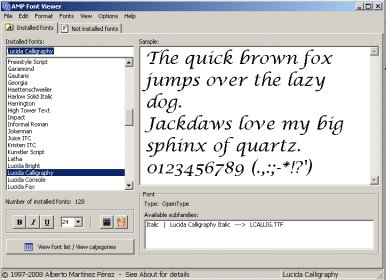
AMP Font Viewer 3.82 is the latest version of this free utility we can download directly from the developer's website.Setting up is quite easy and takes no time. We can use this application to view,manage and categorize all the fonts installed and not installed in our computer.
|
|
With FontCreator, you can create your own fonts (design each character from scratch), or you can take any font file and redesign the characters you want.
You can import and convert images to use them as characters, preview and install the fonts in Windows.
|
|
FontTwister 1.3 is a nice application that provides you with the function of creating special text effects. Using this software, you will be able to add different effect to any word you type on the program's main window. You will be able to add 2D and 3D headings. to modify web graphics, banners, presentations, banners and more.
|
|
Font Manager, the worthy tool with amazing features to manage your Fonts.
If you are looking for a good tool to view, print, zoom, install, uninstall and work along with your fonts, then Font Manager is the best choice. Providing multiple options to deal with your fonts this user friendly tool is featured with multiple options and settings.
|
|
Advanced Font Viewer 5.1 by Alexander G. Styopkin is the latest released version of this program for Windows. Now we can select the program language between Brazilian Portuguese (New Feature), English, Russian and German. Language selection can be done on the go, from the user's interface. It is possible to download the trial version available from the developer's website.
|
|
Font Xplorer is the font application that allows you to choose the "perfect font" for a specific job and easily perform all types of font management & printing chores.
|
|
Free&Easy Font Viewer 2.0 is a software for view the fonts installed in our PC.
The program interface is clean and easy to handle when we opens the program we can see one toolbar and one window with four tags.
In the window the program shows all installed fonts in our Pc,in this way we can familiarize and know all the fonts, especially for the Designers, this program is truly useful.
|
|
X-Fonter is a powerful tool that will let you to visualize all your installed fonts and you will be able to activate or deactivate your fonts only when you need them. X-Fonter also gives you the option to test each one of your fonts on different styles, sizes and colors, and even you will be able to watch them in 3D.
|
|
With the complete set of features this simple tool removes all the unwanted fonts stored on your font folder and recoups the wasted space. Its features include Defrenzy, Frenzy snap, Refrenzy, and Frenzyman. Defrenzy allows you to delete all the fonts excluding the necessary fonts required for MS window operations.
|
|
If you are a graphic designer or just a graphic enthusiast, and are tired of same all True Type Fonts, here is a nice tool that can help you create your all-new fonts of your own. With this tool, you can start from a scratch your True Type Font, or edit the existing ones
|
|
Most operating systems have got their own font management system. But there are users like Graphical designers who require many typefaces and so they would like to have advanced font management software. Cfont Pro is an extremely useful software tool for such kind of users. Cfont Pro is a very high-quality font management software that allows users manage and arrange their fonts.
|
|
Extensis Suitcase for Windows, a useful tool from Extensis for effective font management, can be ideally used as an add-on feature in QuarkXpress, Adobe Illustrator and Adobe InDesign, for optimizing the type of industrial-strength font management that is used by the users of Windows operating system.
|
|
FontLab studio is a fully integrated font editing software with functionalities to support professional font design requirement. Professionals can introduce their own typefaces or redesign existing font to create new fonts. Most of the outline formats are included such as true type, open types and others supported by Adobe, Microsoft etc.
|
|
Fontpage is a simple to use utility to provide an insight into the fonts in the user system. Its application can be linked with creative productions. It provides the user a functionality to go beyond the traditional and exhaustive way of testing fonts and the presentation in bold emphasis or italic style, underline or three dimensional uses.
|
|
NexusFont is a font manager for TOTAL control of a large number of fonts, that, among its many features, allows you to print (or export as image) all the existent fonts in the system, or the entire character map of the specified font. Also, it has features to rename, delete, install, remove, import, export, copy and move the font from or to a specified destination, etc.
|
|
CrossFont is a wonderful application that allows you to convert TrueType and PostScript Type1 fonts between Windows PC and Macintosh platforms. It also even enables you to convert Type 1 fonts to OpenType. You can also preview the fonts and view detailed information about it before conversion to be absolutely sure that that's the font you want to convert.
|
|
A long time ago, I got tired of manually replacing the font colour in all my HTML pages. After a while I discovered that I wanted to replace text that had ENTER or NEWLINE inside. Some times I wanted to replace my TABS inside some textfiles.
This program also supports plain textfiles, Unicode and UTF-8 files.
To be able to do all these things in an easy way, I created Search And Replace.
|
|
FastFontPreview is a limited font manager for Windows. The application allows you to obtain a visual preview of the fonts that you have on your system. Most font preview applications only allow you to view those fonts that you have actually installed on your system. FastFontPreview also shows you any font that it can find, be it on CDs, DVDs, network shares, etc.
|
|
This font manager allows you to preview and manage both installed and uninstalled typefaces and examine your system for font errors. You can display the list of installed font faces, customizable font samples and advanced font properties.
|
|
Font Fitting Room Deluxe is a font manager tool that helps you to activate/deactivte and preview sets of fonts with maximum efficiency. Also supports preview for both installed and yet to be installed fonts , with full character map and multilingual font properties.
|
|
MainType is a powerful but easy to use font manager and font viewer, that takes the frustration out of managing your fonts. You can use it to install, uninstall, preview and group your fonts, print reports, reveal detailed font information and more.
|
|
Comprehensive, professional tool for managing font files on Windows XP/2000/9x systems. Features an elegant Explorer-style interface for viewing TTF, OTF & Type 1 fonts. Has extensive catalog and font sample sheet printing. Includes full uninstall.
|
|
It's never been easier to make your own custom fonts. Scanahand allows you to generate fonts without the need to know all of the technical details involved.
How does it work? Simply print a template, draw all of the characters using a black marker or felt-tip pen, and scan your drawing. Scanahand will build your font, and install it on Windows, ready for you to use. You don't need to use additi
|
|
Windows Fonts Explorer is a powerful font manager for Windows with intuitive, easy-to-use interface and multi-lingual support.It helps you to see how many and what fonts are installed .It supports complete view for all font types: TrueType, TrueType Collections, OpenType, Postscript Type 1, Raster, and Vector Fonts. It also allows you to install your fonts, You can even choose your own sample text
|
|
Popchar allows you to insert special symbols and characters into any kind of document. You just have to click on the desired character and it is automatically inserted into the document. You can change the font and size, match as in the document, or utilize the HTML option. It has a magnifying glass that allows you to make a close-up of the characters.
|